Firmware Update
Release 2177 (Download)
Patch 2177 delivers a refreshed interface, sizable performance wins and full cross‑platform support, while laying the groundwork for upcoming advanced IMU features.
How to install Jazzy build of IMUs without Jazzy distro? (Readmore)
| Area | What’s new |
|---|---|
| Look & Feel | Brand‑new adaptive UI theme |
| Performance | Up to 20% lower RAM footprint and 20 % faster operation. |
| Stability | 30+ bug fixes across the stack |
| Inter‑operability | Simultaneous ROS 2 Humble & Jazzy workspaces |
| Time‑Sync | Built‑in PTP & NTP daemons with automatic master detection |
| Platforms | MacOS, Linux, Windows |
| Connectivity | Native ECM & RNDIS USB gadget modes; hot‑plug just works |
| Hardware Serial | DFU over hardware serial for every Olive component |
| Visualisation | Real‑time 3D IMU viewer with quaternion/Euler overlays |
| Network Stack | Upgraded to v2.0 |
| Parameters | Cleaner, hierarchical parameter tree |
| Docs | Documentation v2.0 with new quick‑start |
| Hardware | Verified with Olive IMU, Camera, Servo X1 & E1 |
Releases History
| Format | Version | Min Firmware | Link | Component | ROS 2 | Note |
|---|---|---|---|---|---|---|
| SWU | 2177 | 3.2.0 | download | IMU / CAM / Servo | Humble / Jazzy | LTS EOL 2026 |
1) If you are updating a patch for the first on a fresh OlixOS
Fist open the update screen on your browser by going to <device_ip>:7070
then browse or drag and drop the (.swu) file olive_one_x.swu to the upload area. Then wait for a minute to software patch updater applies the software patch on your fresh OlixOS.
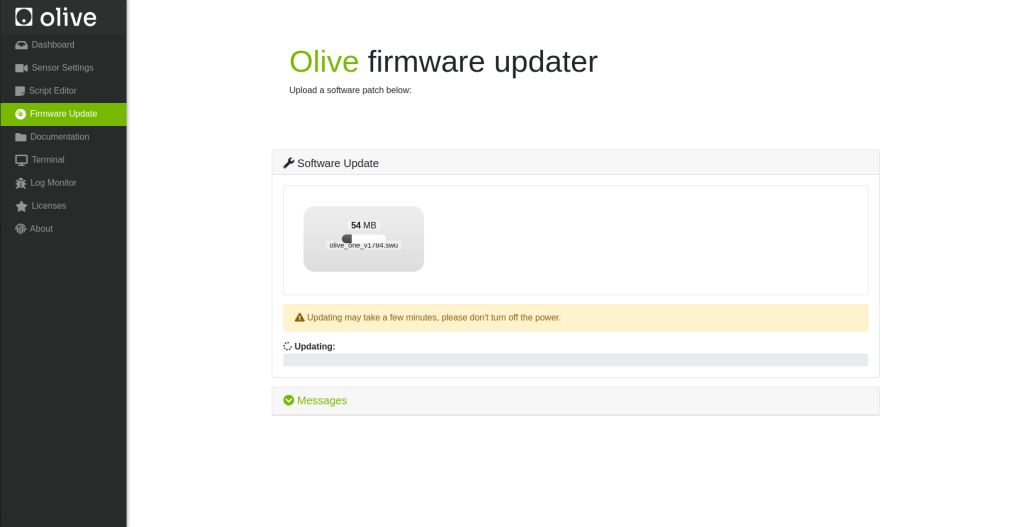
2) If you are updating a patch on a working OlixOS
Fist open the update screen by simply going to <device_ip> then select the Firmware Update from the left panel.
then browse or drag and drop the (.swu) file olive_one_x.swu to the upload area. Then wait for a minute to software patch updater applies the software patch on your current OlixOS.
How can i see what is my current Software Patch?
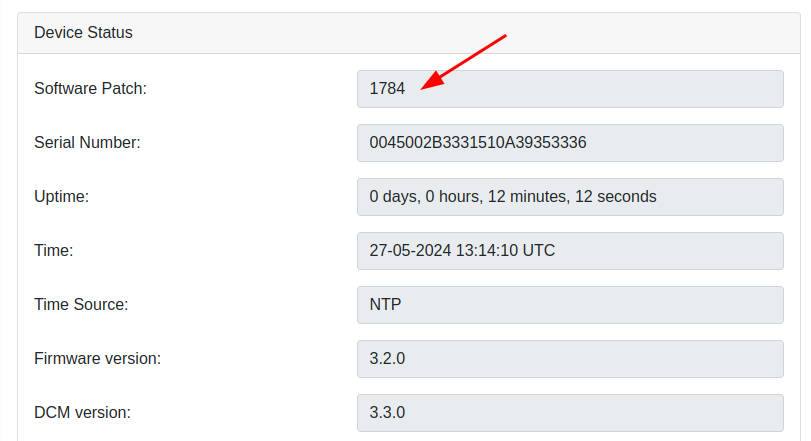
In the Olive GUI dashboard in the device status group box you can see your current software patch version.