Skip to content
Developers
  • Developers
    • Quick Start & Onboarding
      • Welcome to Olive Robotics
      • Quick Start
      • FAQ
    • Platform Installation
      • Windows
      • MacOS
      • Linux
    • System & Configuration
      • Firmware Update​
      • olixOS Releases​
      • Environment Variables​
      • Network Configuration​
      • Internet Sharing​
      • Time Synchronization​
      • SSH​
      • Reset Factory​
      • Examples / Apps
      • Web-based GUI​
      • olixOS
      • Configs
    • ROS & Interoperability
      • ROS 2 Installation
      • RIG Reconfigure​
      • Plot Juggler​
      • RViz 2​
      • RQT
      • ROS 2 Bridge​
      • Data Distribution Service (DDS) ​
      • Recording and playing​
  • Products
    • olixSense
      • X1
      • X1 Pro
      • X1 Ultra
    • olixVision
      • V1
    • olixLink
      • C1
    • olixBot
      • G1
      • O1
    • Archive
      • olixServo
      • olixCore
      • olixGNX
      • olixSonar
      • olixAnt
      • olixOwl
  • Knowledge Base
    • Accelerometers
    • Gyroscopes
    • Magnetometers
    • Sensor Fusion
    • Attitude & Heading Reference System (AHRS)
    • Inertial Navigation System (INS)

Configs

Estimated reading: 1 minute 33 views

​Olive config files are located at:

/opt/olive/config/current
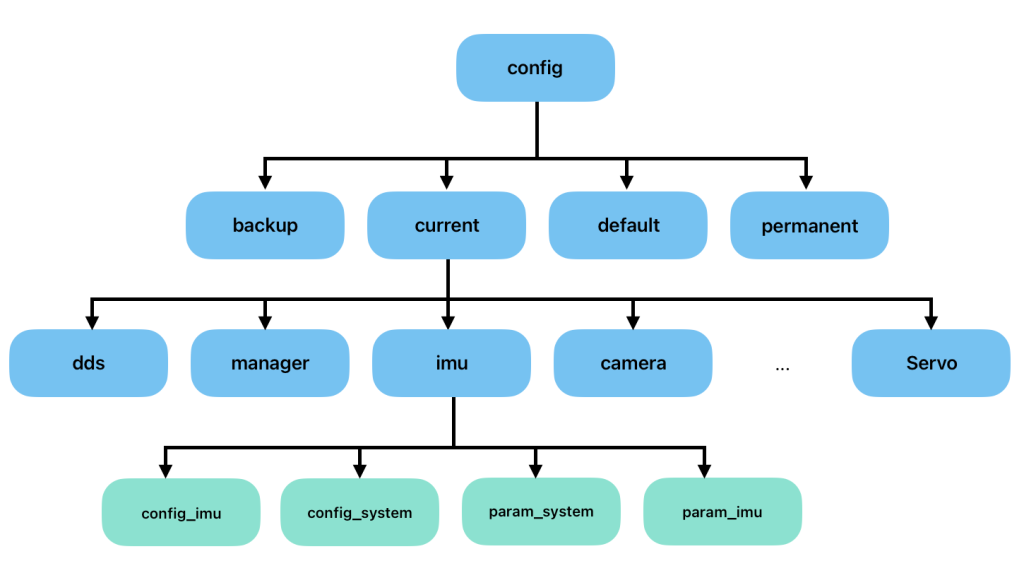
Here, for each component type, you will see a separate folder containing two types of YAML files. The first type is the config files, which are related to startup configurations, and the second type is the param files, which are related to real-time ROS parameter interactions.

[betterdocs_search_form]

Share this Doc

Configs

Or copy link

Clipboard Icon
CONTENTS
olive® ROBOTICS

Interoperable Embedded Robotics

All rights reserved